
Recently, a dangerous malware has been targeting WordPress websites, displaying a fake Cloudflare verification page to visitors.
This issue not only disrupts user experience but can also severely damage your website’s reputation, SEO rankings, and trust.
I’ve personally helped multiple clients successfully remove this malware and secure their websites.
What is Cloudflare Fake Verification Malware?
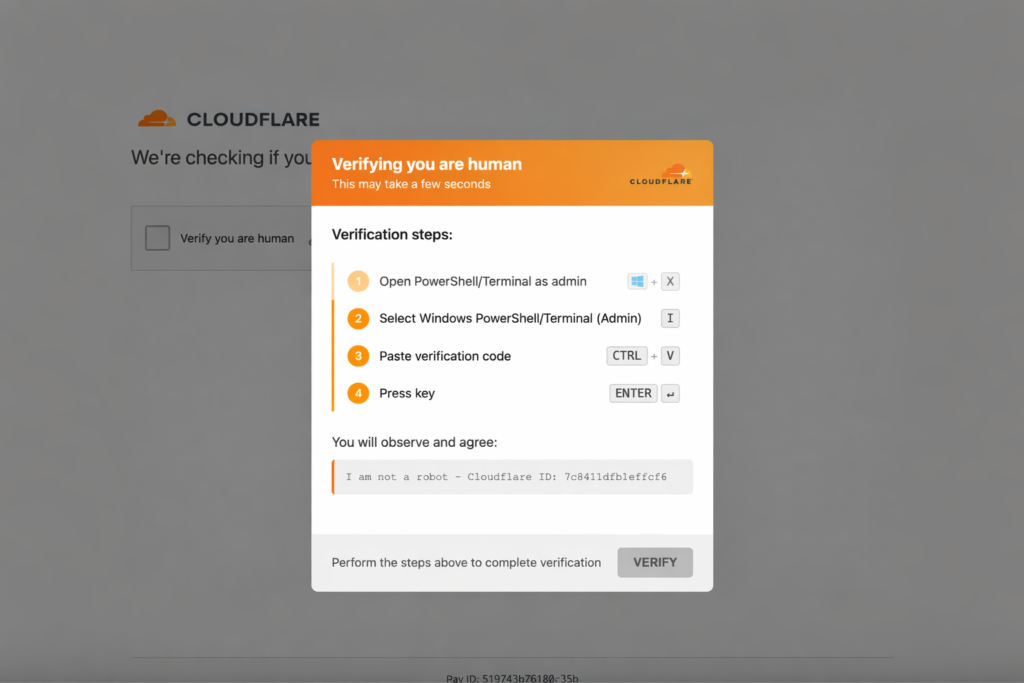
This malware tricks visitors by showing a fake “Checking your browser” or Cloudflare verification screen.
It can:
- Redirect users to malicious or spam websites
- Inject harmful scripts into your site
- Lower your SEO rankings
- Get your website blacklisted by Google
- Damage your brand credibility
Signs Your WordPress Site is Infected
You may be infected if you notice:
- Fake Cloudflare verification loop
- Random redirects to spam, casino, or phishing sites
- Different behavior on mobile vs desktop
- Slow admin panel or unusual activity
- Sudden drop in website traffic
If you see these signs, your website is likely compromised.
How Does This Malware Infect Websites?
Common causes include:
- Nulled or pirated themes/plugins
- Outdated WordPress core or plugins
- Weak passwords
- Poor hosting security
How to Remove Cloudflare Fake Verification Malware
Step 1: Take a Full Backup
Always create a full backup (files + database) before making changes.
Step 2: Scan and Remove Suspicious Files
Check these directories:
- /wp-content/uploads/
- /wp-includes/
- Unknown or hidden PHP files
- Randomly named folders
Step 3: Clean .htaccess and Core Files
Malware often:
- Injects redirect scripts
- Adds obfuscated (encoded) code
Step 4: Scan the Database
Look for:
- Malicious scripts in wp_options
- Injected JavaScript
- Unknown entries
Step 5: Change All Passwords
Update:
- WordPress admin credentials
- Hosting account
- FTP/SFTP access
- Database passwords
Step 6: Strengthen Website Security
- Install security plugins (Wordfence or Sucuri)
- Enable firewall protection
- Keep everything updated
Important Note
Removing malware is not enough. If the root cause is not fixed, the infection will return.
Professional WordPress Malware Removal Service
If you’re not comfortable fixing this yourself or want a guaranteed solution, I can help.
✔ Complete malware removal
✔ Clean and restore website safely
✔ Security hardening
✔ Protection against future attacks
Contact Me
If your website is infected or you need professional help:
Email: akhubaib963@gmail.com
Fast response and reliable service
Conclusion
Cloudflare fake verification malware is a serious threat to WordPress websites. Taking quick action is critical to protect your site, users, and business.